The Stamped blog
The Top Shopify Product Bundle Apps to Consider in 2027
The best bundles don't feel like someone taped two products together and slapped on a discount. They solve a shopping problem, whether that's helping a first-time buyer find their routine or letting a repeat customer stock up on what they love.
We compared five Shopify bundle apps based on the job each one does best, so you can match the tool to the experience you actually want to create.
Uncategorized
by Jaime Viera
The best bundles rarely feel like someone simply taped two products together and added “save 10%.”
They solve a shopping problem.
Maybe a first-time customer doesn’t know which products belong in their routine. Maybe a repeat customer wants to stock up on the product they buy every month. Maybe shoppers want to choose their favorite flavors, shades, or sizes instead of buying a bundle somebody else selected for them.
Done well, bundles can make the shopping experience easier while increasing average order value and helping customers discover more of your catalog.
The challenge is finding the Shopify bundle app that matches the experience you want to create.
So instead of treating every Shopify bundling app as interchangeable, we’ve compared five based on the job each one does best.
1. Simple Bundles & Kits
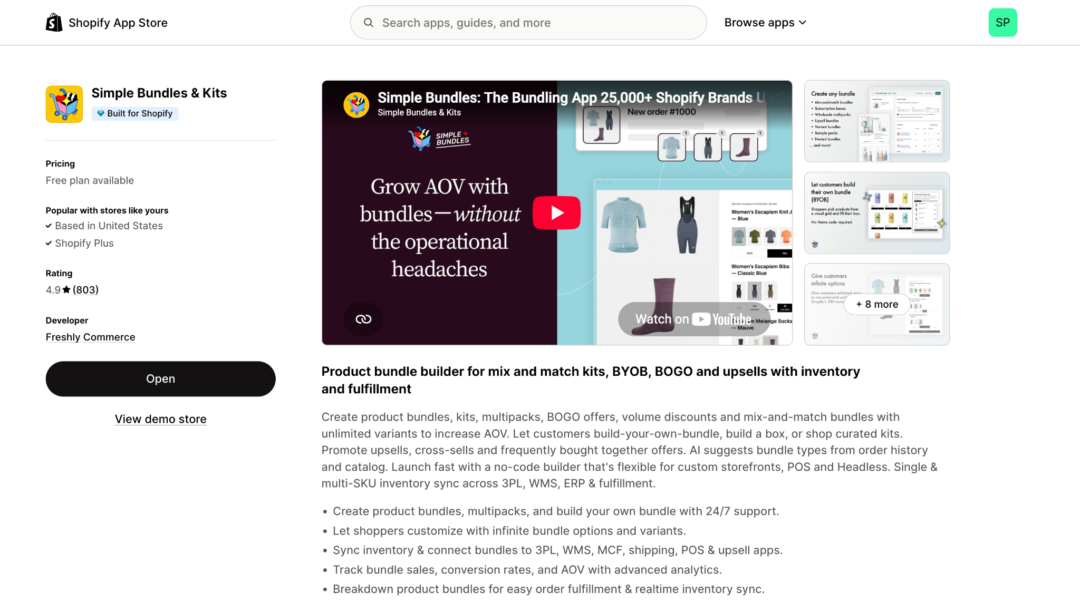
Simple Bundles is built around both sides of bundling: the customer-facing experience and the operational workflow behind it.
On the storefront, merchants can create fixed bundles, multipacks, mix-and-match bundles, build-your-own bundles, build-a-box experiences, BOGO offers, volume discounts, product add-ons, cross-sells, upsells, and frequently bought together recommendations.
Just as importantly, those bundle types aren’t limited to rigid, one-size-fits-all layouts.
Brands can customize how their bundles are presented to shoppers, including product and color swatches, variant selectors, quantity pickers, dynamic pricing, product imagery, bundle layouts, and other storefront elements. That flexibility applies across the different bundle experiences Simple Bundles supports, so merchants can create something that feels native to their brand rather than dropping a generic bundle widget onto the page.
For example, a beauty brand could create a visual build-your-own routine with swatches and product selections. A food brand could let shoppers choose flavors and quantities for a custom box. An apparel merchant could create a fixed outfit bundle while still giving customers control over sizes, colors, or other product variants.
Simple Bundles supports no-code storefront setup for merchants that want to launch quickly, while also giving brands more room to customize when their requirements are more advanced, including Shopify POS and headless storefronts.
What happens when the bundle sells?
The storefront experience is only one half of the setup.
Simple Bundles can also connect the bundle customers see to the individual component SKUs inside it.
That means inventory can remain tied to the actual products being sold, while orders can be broken down into the individual items a fulfillment team needs to pick and pack.
This becomes increasingly important when bundles need to work across:
- Multiple inventory locations
- Shopify POS
- 3PLs
- WMS and ERP systems
- Subscription workflows
- Headless storefronts
- Custom product attributes
- Large numbers of bundle configurations
So merchants don’t have to choose between a highly customized storefront experience and a bundle setup that works cleanly behind the scenes.
Simple Bundles also includes bundle analytics and AI functionality that can use catalog and order data to help merchants identify new bundling opportunities.
Choose Simple Bundles if:
You want significant control over how every type of bundle is presented and merchandised to customers, while still keeping inventory, fulfillment, and the rest of your Shopify stack connected behind the scenes.
It’s particularly well suited to brands that want their bundle experiences to become more customized and sophisticated over time without having to rebuild the operational side later.
2. Easy Bundles: Best for guided build-your-own experiences
Sometimes shoppers don’t want a pre-made kit.
They want the experience of making one.
Easy Bundles puts significant emphasis on guided build-a-box flows where customers move through a series of selections to construct the finished bundle.
That can be a particularly good match for products such as:
- Gift boxes
- Snack assortments
- Coffee or tea samplers
- Subscription boxes
- Personalized routines
- Corporate gifts
- Curated product sets
Rather than presenting customers with one enormous list of products, a merchant can guide them through the process one step at a time.
The app also supports other bundle formats, including fixed bundles, mix-and-match offers, quantity breaks, subscriptions, free gifts, and product add-ons.
Choose Easy Bundles if:
The act of building the box is central to the shopping experience and you want customers to move through a structured selection flow.
3. Fast Bundle: Best for stores using bundles throughout the customer journey
A bundle doesn’t have to exist only on a dedicated “bundle” page.
Maybe someone is shopping for one product and should see a frequently bought together recommendation.
Maybe another customer should see a quantity break.
Someone else might receive a free gift after qualifying for an offer.
Fast Bundle supports a broad mix of formats, including fixed bundles, build-your-own experiences, mix-and-match bundles, BOGO and Buy X Get Y offers, volume discounts, free gifts, product add-ons, quantity breaks, upsells, and frequently bought together recommendations.
That range makes it useful for brands that treat bundling as part of merchandising across the store rather than one isolated product strategy.
Choose Fast Bundle if:
You want to experiment with many different bundle and upsell formats and prefer to manage them from one platform.
4. Vitals: Best for stores consolidating multiple conversion tools
Not every store wants a specialized app for every individual ecommerce tactic.
Vitals takes the opposite approach.
It combines a large set of marketing and conversion tools in one app, with features spanning areas such as product reviews, bundles and upsells, visitor recordings, email capture, back-in-stock alerts, and other storefront tools.
On the bundling side, that includes promotional tactics such as BOGOs, volume discounts, gifts, and upsell offers.
This makes Vitals an interesting option when bundling is one component of your optimization strategy rather than something requiring a deeply specialized bundling architecture.
For a newer or relatively lean store, reducing the number of separate apps handling reviews, upsells, and other conversion functionality may also be appealing.
Choose Vitals if:
You want bundle functionality alongside reviews and a broader collection of conversion tools, rather than installing a dedicated app for each one.
5. Shopify Bundles: Best for getting started for free
Shopify Bundles is Shopify’s own free bundle app.
The feature set is considerably more focused than many dedicated bundle platforms, but that isn’t necessarily a disadvantage if your requirements are straightforward.
Merchants can create fixed bundles and multipacks, allow shoppers to select associated variants, and have inventory respond to the availability of the components inside the bundle.
For example, you might create:
- A basic haircare set
- A three-pack of shirts
- A coffee starter kit
- A fixed gift set
If that’s as complicated as your bundle strategy gets, Shopify’s native option may be enough.
The limitations become more noticeable when you want to introduce interactive build-your-own experiences, extensive upselling, more complicated promotional structures, or advanced backend workflows.
Choose Shopify Bundles if:
You want to test fixed bundles or multipacks before investing in more specialized bundle functionality.
What should you look for in a Shopify bundle app?
The right app depends on more than how many bundle types appear on its feature page.
Think about the entire customer experience.
Does the bundle make the purchase easier?
Bundles work best when there’s a reason the products belong together.
That might mean helping a first-time buyer understand where to start.
It could mean making replenishment easier.
It could give customers a chance to customize a product assortment.
Or it could simply save someone from visiting three different product pages to buy items that are typically used together anyway.
The technology should support that experience rather than forcing you into a particular bundle format.
How much customization does the customer need?
Compare a fixed gift set with a build-your-own snack box.
The first might need little more than an ordinary product page.
The second could require:
- Product selection
- Quantity limits
- Variant selection
- Flavors or colors
- Swatches
- Progress indicators
- Live price changes
- Rules around minimum or maximum products
If customization is central to the experience, evaluate those storefront capabilities closely.
Where will customers discover the bundle?
Some shoppers will intentionally visit a bundle page.
Others won’t.
You may want to introduce a bundle when someone is already viewing one of the products inside it.
Or suggest complementary items in the cart.
Or sell the same bundle in a physical store through Shopify POS.
Think beyond the bundle PDP and consider how the offer fits into the entire purchase journey.
Does it make sense for returning customers too?
Bundles don’t have to be exclusively about increasing the size of a customer’s first order.
They can also help make subsequent purchases easier.
A customer who already knows which products they like may appreciate a multipack. Someone replenishing several products could benefit from a routine bundle. Loyal customers might enjoy building a customized box from their favorites.
The best bundle strategy can therefore support both product discovery and repeat purchasing.
What happens after checkout?
A beautiful bundle-builder doesn’t help much if the order creates chaos in your warehouse.
Suppose someone builds a gift box containing four different items.
Can your fulfillment team see all four?
Does inventory decrease for the correct SKUs?
What gets sent to your 3PL?
Does the same setup work through POS?
Can your ERP or WMS understand the order?
Smaller stores may not need sophisticated answers to all of those questions yet.
But if bundles become successful, those operational details tend to matter much sooner than expected.
Which Shopify bundling app should you choose?
Start with the shopping experience you’re trying to improve.
If you want customers to build highly personalized boxes, prioritize bundle-builder functionality. If customers regularly purchase multiples, quantity breaks may be more valuable. If bundling is only one part of your CRO strategy, an all-in-one solution may make sense.
And if bundles are becoming a major product strategy across ecommerce, retail, subscriptions, and fulfillment, look closely at how the app handles both the frontend experience and the individual SKUs underneath it.
Ultimately, good bundling isn’t about convincing someone to buy a random extra product.
It’s about making a larger purchase make more sense for the customer.